Broadband & Landline

Post here to ask/answer questions around home broadband and landline

cancel
Showing results for 
Show  only  | Search instead for 
Did you mean: 

Forum Posts

EE Hub firmware versions

We regularly update your Smart Hub to keep your broadband secure, stable, and performing at its best, often adding new features and behind-the-scenes fixes.   Hub nameModelCurrent firmware versionNotesSmart Hub 6 PlusSH30Ar4.26.3 Smart Hub 6 PlusSH31...

James_B by • EE Community Manager
  • 5880 Views
  • 0 replies
  • 9 Helpful

Top Tips for pairing your WiFi Extenders to the Smart Hub 7 Pro

We’ve seen a few customers asking for help pairing their extenders wirelessly with their Smart Hub 7 Pro. We haven’t been able to confirm a fault, but if you need some more help, there’s a reliable workaround that usually gets things connected first ...

Chrissy_G by • EE Knowledge Specialist
  • 6459 Views
  • 30 replies
  • 25 Helpful

Need Help with Your Home Broadband Speed or Connection?

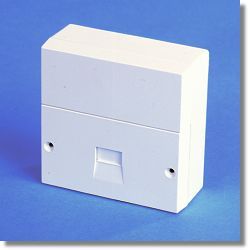
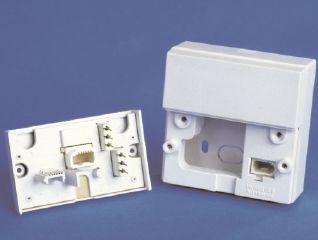
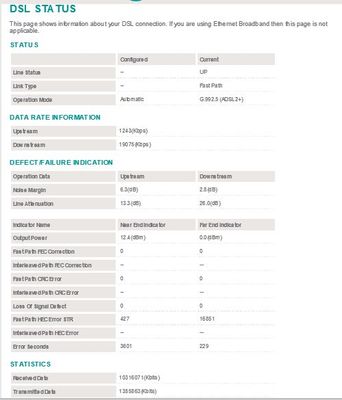
To effectively help you with any Broadband speed or connection issues we would need to see some hard data about your line after carrying out a few short tests for starters, which will enable us to diagnose the problem and advise you further.   Using ...

NTE5_fl NTE5_all_2 Capture.JPG Capture2.JPG
XRaySpeX by • EE Community Star
  • 48838 Views
  • 2 replies
  • 11 Helpful

Changing Your WiFi Password on a Smart Hub

You may have seen in the News that some ISPs have had a security breach whereby their users' routers WiFi passwords have been hacked. You might want to change the WiFi password of your EE Smart Hub router in case a similar attack is made against EE's...

XRaySpeX by • EE Community Star
  • 95710 Views
  • 11 replies
  • 13 Helpful

Smart Hub Pro WAN speed limited to 100 mBPS

I have just taken delivery of a Smart Hub Pro. I plugged it all in and let it settle down and update.On going to the web interface I noticed that the WAN speed is set to 100 mbps.When I plug in my Smart Hub Plus it is 1000 mbpsAny ideas what the issu...

Ewan15 by • Expert Contributor
  • 2244 Views
  • 8 replies
  • 0 Helpful

Resolved! Information needed for a

Afternoon, I’m swapping over to your Broadband, and was asked for information regarding this, if I owe the other company any payment. I can’t find the email for thiscan you help 

Using 3rd party mesh system with EE Broadband

If I want to eventually use a 3rd party mesh system after getting EE broadband, do I just need to set aside the EE router and plug one of the mesh boxes direclty into the BT Openreach ONT/Modem?Also  - does this mean that an landline I have specified...

Javert by • Investigator
  • 1260 Views
  • 1 replies
  • 1 Helpful

Always connected what a joke

I have the all singing all dancing always connected broadband (4g hub kicks in if internet goes down)2 days ago  main hub stops working 4g kicks in,so far so good.until I phone tech support after numerous test the main hub is found to be faulty new o...

Graemee by • Investigator
  • 963 Views
  • 3 replies
  • 2 Helpful

No broadband connection

Transferred to EE from BT  nearly 12months ago but the last week I've had intermittent connection. The last 3 days has been horrendous with the router  flashing  orange for long periods of time and not connecting . I have rebooted, factory resetted t...

Why my ee app pair and connect to my smart hub?

Since been forced to upgrade from BT to ee by a lady in one ee shop, my home broadband gone completely slow and bad. Apart from all the issues and phone calls, my ee app doesn’t pair or connect to the hub, so can’t do parental controls and other thin...

How to stop closure of fault when still ongoing problem

Fast fibre upgrade, now good signal but no wifi. Engineer came tried 3 different routers and new cables, still no wifi. Said fault due to Openreach installation, but Openreach check line when booked say no fault and close fault. Stuck with no wifi an...

BDK by • Visitor
  • 657 Views
  • 3 replies
  • 4 Helpful

IPV4 vs IPV6 and cloudflare

Using a Service that uses cloudflare which struggles to always keep connected. on making it work on my broadband i had to switch off IPv6 address allocation under http://192.168.1.254/IPv6.htm . it got me thinking why have i got to do this if EE are ...

Russkil by • Valued Contributor
  • 2521 Views
  • 3 replies
  • 0 Helpful

No Internet Connection

LOS light is solid red. I don't have a mobile phone, and it will not let me complete the network tests without supplying one. Wont let me book any sort of repair either. 

Joseph87 by • Explorer
  • 723 Views
  • 3 replies
  • 1 Helpful