Turn on suggestions
Auto-suggest helps you quickly narrow down your search results by suggesting possible matches as you type.
- EE Community
- Account
- EE app and website
- Odd formatting on EE Help webpage(s)
Options
- Subscribe (RSS)
- Mark as unread
- Mark as read
- Float to top
- Bookmark
- Subscribe (email)
- Mute
- Print this discussion
Odd formatting on EE Help webpage(s)


Options
- Mark as unread
- Bookmark
- Subscribe
- Mute
- Subscribe (RSS)
- Permalink
- Print this post
- Report post
10-11-2023 04:12 PM - edited 10-11-2023 04:20 PM
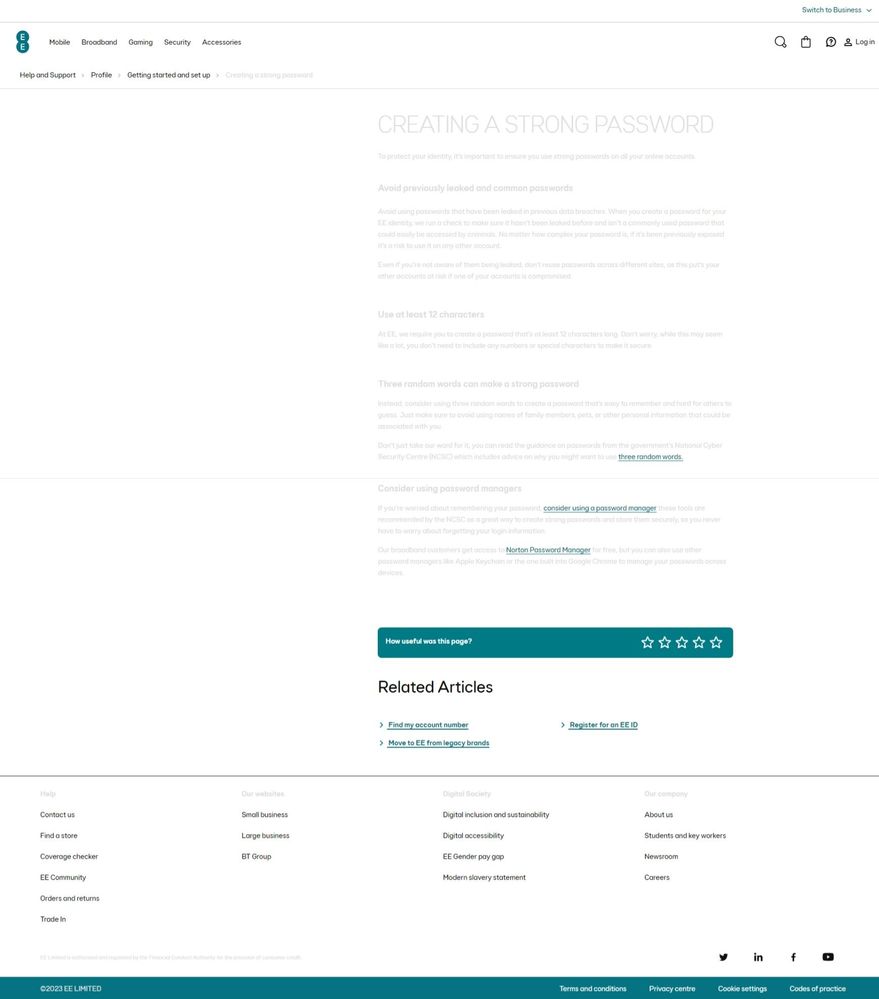
Not sure what has happened - using Edge, screengrab included. (Same effect in Firefox too!)
9 REPLIES 9


Options
- Mark as unread
- Bookmark
- Subscribe
- Mute
- Subscribe (RSS)
- Permalink
- Print this post
- Report post
10-11-2023 05:18 PM
Hi @354-
Same in Chrome.
Thanks
To contact EE Customer Services dial 150 From your EE mobile or 07953 966 150 for mobile and 0330 123 1105 for Broadband..
EE standard opening hours are Monday to Friday, 8am to 9pm - Saturday and Sunday, 8am to 8pm.

Options
- Mark as unread
- Bookmark
- Subscribe
- Mute
- Subscribe (RSS)
- Permalink
- Print this post
- Report post
10-11-2023 05:52 PM
Which device are you both using, @354- and @Northerner? Just trying to replicate the issue and it's showing OK for me (Edge).

Chris
Options
- Mark as unread
- Bookmark
- Subscribe
- Mute
- Subscribe (RSS)
- Permalink
- Print this post
- Report post
10-11-2023 06:07 PM
@Christopher_G - PC - Windows 10
Options
- Mark as unread
- Bookmark
- Subscribe
- Mute
- Subscribe (RSS)
- Permalink
- Print this post
- Report post
10-11-2023 06:12 PM
Edge Version 119.0.2151.58 (Official build) (64-bit)
Mozilla Firefox - 119.0.1 (64-bit)
Options
- Mark as unread
- Bookmark
- Subscribe
- Mute
- Subscribe (RSS)
- Permalink
- Print this post
- Report post
10-11-2023 06:14 PM
@Christopher_G - What device are you using and version of Edge?
Options
- Mark as unread
- Bookmark
- Subscribe
- Mute
- Subscribe (RSS)
- Permalink
- Print this post
- Report post
10-11-2023 06:24 PM
Thanks @354-
Windows 10 Laptop, looks like I'm on a slightly older version: 118.0.2088.76.
I'll see if I can get this fed back, thanks for sending that information over. 🙂
Chris
Options
- Mark as unread
- Bookmark
- Subscribe
- Mute
- Subscribe (RSS)
- Permalink
- Print this post
- Report post
10-11-2023 06:31 PM
@Christopher_G - From the original screen grab, the chunks of text/info/content is there. But in order to see the content more clearly you have to highlight the text/content, this highlights the text content and is more apparent when selected. It seems like there is some type of layer on top that is making the text less visible?
Options
- Mark as unread
- Bookmark
- Subscribe
- Mute
- Subscribe (RSS)
- Permalink
- Print this post
- Report post
10-11-2023 06:33 PM
Yeah, those were my thoughts from your screen grab too, @354-
It looks like it would if a pop-up comes up.
Chris
Options
- Mark as unread
- Bookmark
- Subscribe
- Mute
- Subscribe (RSS)
- Permalink
- Print this post
- Report post
10-11-2023 06:39 PM
@Christopher_G - Here's a "highlighted" text screen grab. If you don't highlight the text, the content is barely visible. Hopefully the web team will have eyes on it! 🔧 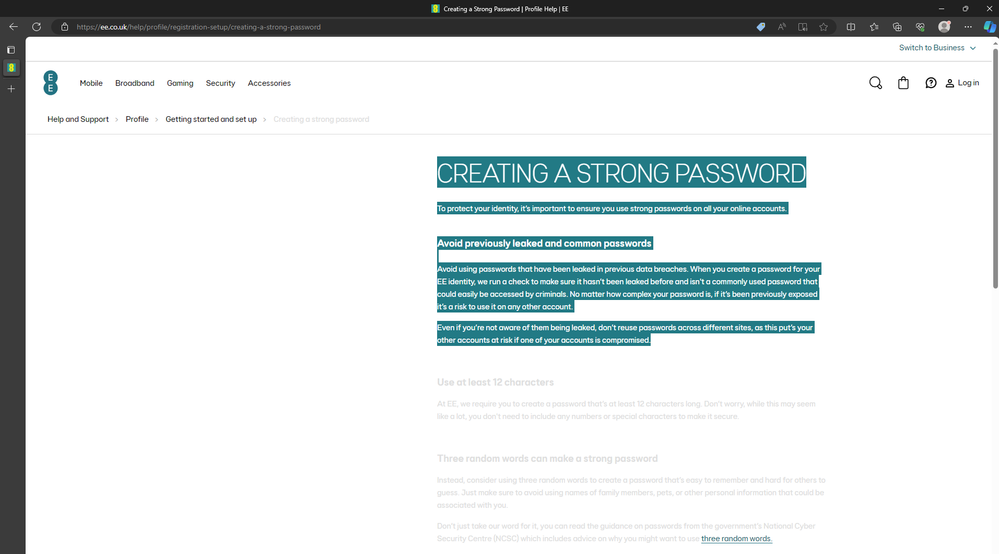

Related Content
- PDF BILL - Unrecognized format in Contracts & Billing
- Bad format in EE app and website
- EE Webpage will not load / pair broadband account in EE app and website
- I'm trying to upgrade my mobile. However, the webpage is not loading. in Contracts & Billing
- How do I buy the pack for 100 minutes of international calls? EE webpage error in Pay as you go
