Turn on suggestions
Auto-suggest helps you quickly narrow down your search results by suggesting possible matches as you type.
- EE Community
- Home Services
- Broadband & Landline
- Re: Router page - renaming connected devices - how?
Options
- Subscribe (RSS)
- Mark as unread
- Mark as read
- Float to top
- Bookmark
- Subscribe (email)
- Mute
- Print this discussion
Router page - renaming connected devices - how?


Options
- Mark as unread
- Bookmark
- Subscribe
- Mute
- Subscribe (RSS)
- Permalink
- Print this post
- Report post
21-11-2023 08:32 PM - edited 21-11-2023 09:08 PM
Hi, having recently switched over from the BT Smart Hub router to the EE Smart Hub Plus, there seems to be no way of changing the devices names connected in the router page, such as connected Printers, Tablets, Phones, TVs etc,
For example a Laptop is displayed in the router page as "Dell Windows PC/Laptop", and it doesn't pick up the actual name ie "X Laptop" set on the actual Laptop itself like the BT Home Hub did (you could enter a name for the device on the router page if you wanted to override it), and there seems to be no way to rename this device on the router page?!
Is that the case? Am I stuck with these names instead of being able to set the names of the devices that show up as connected devices in the router page.
I have some NAS devices that just show the MAC address now which is really annoying - Is there any way to fix this??
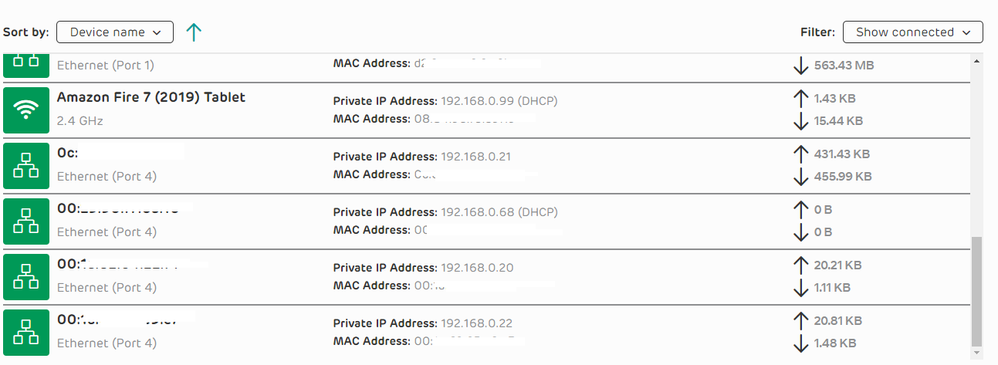
Devices that show up incorrectly:

38 REPLIES 38

Options
- Mark as unread
- Bookmark
- Subscribe
- Mute
- Subscribe (RSS)
- Permalink
- Print this post
- Report post
20-07-2024 09:14 AM
I wish I hadn't been forced to upgrade. This hub is so much worse in terms of functionality to its BT predecessor. I can't rename anything !!!


Options
- Mark as unread
- Bookmark
- Subscribe
- Mute
- Subscribe (RSS)
- Permalink
- Print this post
- Report post
20-07-2024 09:37 AM
@davidcummin You have to use the App to rename devices that the Router cannot work out correctly, it is the only way to do it, and in some cases the name does stick and cannot be updated.


Options
- Mark as unread
- Bookmark
- Subscribe
- Mute
- Subscribe (RSS)
- Permalink
- Print this post
- Report post
04-12-2024 04:39 PM
...I use to have a BT Router, which had the renaming facililty.
The only way I have managed to get around this problem, withe EE Router, is to create a mapping in a Spreadsheet, not ideal but the only way I have to quickly identify what's what from a Network Admin perspective.
Options
- Mark as unread
- Bookmark
- Subscribe
- Mute
- Subscribe (RSS)
- Permalink
- Print this post
- Report post
04-12-2024 04:53 PM
@Network-Admin You can us the EE app to rename devices, it just sometimes does not translate to the router via the web manager, but it is extremely sticky on the app.

Options
- Mark as unread
- Bookmark
- Subscribe
- Mute
- Subscribe (RSS)
- Permalink
- Print this post
- Report post
29-01-2026 07:34 PM
As I see it, the Web interface and tge EE app should both be able to do the same things. That tou suggest the app can do more is ridiculous since any modification has to be handled by the router's firmware in any case.
I have several NAS devices on my network, and these do not show up as the DHCP host name. Instead it shows a replica of the MAC address which is unhelpful. The web interface offers an edit option, which doesn't work. Instead if I go to the app, I can edit individual items, but not properly. The correct method would be to rename the DHCP address, thus the desired name would show in any interface. But that option is not available anywhere. This is very poor programming and let's the adequate router down. Surely you could get a simple fix but making a software/firmware update available?

Options
- Mark as unread
- Bookmark
- Subscribe
- Mute
- Subscribe (RSS)
- Permalink
- Print this post
- Report post
29-01-2026 07:37 PM
@Yt081039 Then call EE to get it done!
Options
- Mark as unread
- Bookmark
- Subscribe
- Mute
- Subscribe (RSS)
- Permalink
- Print this post
- Report post
29-01-2026 07:42 PM
But you need to be able to rename the DHCP label, since the MAC is uninformative and is shown below anyway. (See screenshot) The renaming method you describe may or may not work via the app only. It does not apply it to the router itself, so the desired naming is not shown universally. What we have here is simply not good enough
Options
- Mark as unread
- Bookmark
- Subscribe
- Mute
- Subscribe (RSS)
- Permalink
- Print this post
- Report post
29-01-2026 07:45 PM
Jim, are your saying they can make the required router edits remotely, and yet as a user who is IT savvy, I can't?
Options
- Mark as unread
- Bookmark
- Subscribe
- Mute
- Subscribe (RSS)
- Permalink
- Print this post
- Report post
29-01-2026 07:58 PM - edited 29-01-2026 07:59 PM
In pretty much every single router I have ever used you can modify the device name directly on the router page, which is completely normal, but not EE, it sucks so much that you have to do it through the app, I don't want an additional app, since the router clearly has the functionality to be able to rename devices, yet for some reason this is not an option given to the end user.
Only thing we can do is complain to EE about it, but I doubt they will ever make the change.
If anyone from EE is listening, please add the functionality that allows the end user to change the device names directly on the router page like every single other router out there can do, even on the old BT routers it was possible to do this!!!!


Options
- Mark as unread
- Bookmark
- Subscribe
- Mute
- Subscribe (RSS)
- Permalink
- Print this post
- Report post
29-01-2026 08:12 PM
@monitorcurve : Pity the poor soul who has no smartphone or any mobile phone at all who is handicapped from doing many useful things with the router.
Let EE bin the app from config'ing the router at all & let it concentrate on its original purpose of managing the contract & billing a/c of the product.
If you think I helped please feel free to hit the "Thumbs Up" button below.
To phone EE CS: Dial Freephone +44 800 079 8586 - Option 1 for Home Broadband & Home Phone or Option 2 for Mobile Phone & Mobile Broadband
ISPs: 1999: Freeserve 48K Dial-Up > 2005: Wanadoo 1 Meg BB > 2007: Orange 2 Meg BB > 2008: Orange 8 Meg LLU > 2010: Orange 16 Meg LLU > 2011: Orange 20 Meg WBC > 2014: EE 20 Meg WBC > 2020: EE 40 Meg FTTC > 2022:EE 80 Meg FTTC SoGEA > 2025 EE 150 Meg FTTP
To phone EE CS: Dial Freephone +44 800 079 8586 - Option 1 for Home Broadband & Home Phone or Option 2 for Mobile Phone & Mobile Broadband
ISPs: 1999: Freeserve 48K Dial-Up > 2005: Wanadoo 1 Meg BB > 2007: Orange 2 Meg BB > 2008: Orange 8 Meg LLU > 2010: Orange 16 Meg LLU > 2011: Orange 20 Meg WBC > 2014: EE 20 Meg WBC > 2020: EE 40 Meg FTTC > 2022:EE 80 Meg FTTC SoGEA > 2025 EE 150 Meg FTTP

Related Content
- EE Smart Hub 7 Locking Out in Broadband & Landline
- Wifi Multi-Device Dongle not picking up wifi printer. in Mobile Broadband
- Wifi extender won't attach to broadband despite power light being Aua Blue in Broadband & Landline
- I am writing to formally register a complaint regarding the service provided und in Broadband & Landline
- EE WiFi 7 Router & Amplifi HD mesh in Broadband & Landline
