Turn on suggestions
Auto-suggest helps you quickly narrow down your search results by suggesting possible matches as you type.
- EE Community
- Home Services
- Broadband & Landline
- Router page - renaming connected devices - how?
Options
- Subscribe (RSS)
- Mark as unread
- Mark as read
- Float to top
- Bookmark
- Subscribe (email)
- Mute
- Print this discussion
Router page - renaming connected devices - how?


Options
- Mark as unread
- Bookmark
- Subscribe
- Mute
- Subscribe (RSS)
- Permalink
- Print this post
- Report post
21-11-2023 08:32 PM - edited 21-11-2023 09:08 PM
Hi, having recently switched over from the BT Smart Hub router to the EE Smart Hub Plus, there seems to be no way of changing the devices names connected in the router page, such as connected Printers, Tablets, Phones, TVs etc,
For example a Laptop is displayed in the router page as "Dell Windows PC/Laptop", and it doesn't pick up the actual name ie "X Laptop" set on the actual Laptop itself like the BT Home Hub did (you could enter a name for the device on the router page if you wanted to override it), and there seems to be no way to rename this device on the router page?!
Is that the case? Am I stuck with these names instead of being able to set the names of the devices that show up as connected devices in the router page.
I have some NAS devices that just show the MAC address now which is really annoying - Is there any way to fix this??
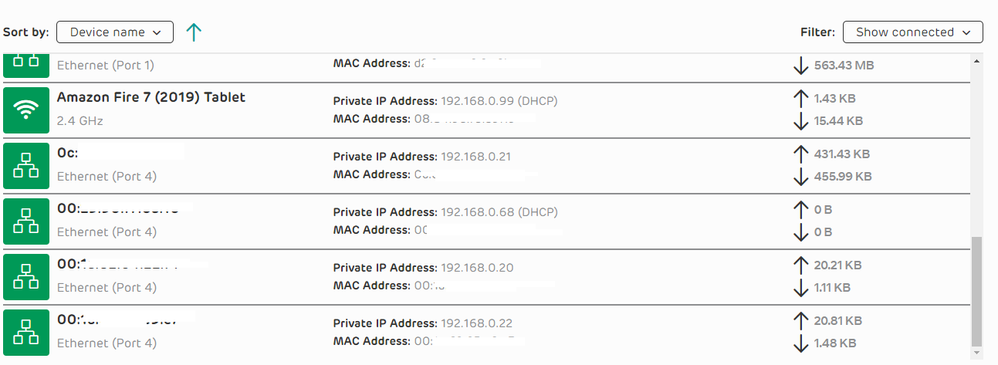
Devices that show up incorrectly:

38 REPLIES 38


Options
- Mark as unread
- Bookmark
- Subscribe
- Mute
- Subscribe (RSS)
- Permalink
- Print this post
- Report post
06-02-2026 03:49 PM
You are of course spot on. If only they would allow intelligent
feedback, the product would be so, so much better!
I think the attitude is, we mustn't let the great unwashed look under
the bonnet, in case they see how lazy we are, and the management get
wind of it!
feedback, the product would be so, so much better!
I think the attitude is, we mustn't let the great unwashed look under
the bonnet, in case they see how lazy we are, and the management get
wind of it!
Options
- Mark as unread
- Bookmark
- Subscribe
- Mute
- Subscribe (RSS)
- Permalink
- Print this post
- Report post
06-02-2026 03:57 PM
Tbh I think it's more to do with incompetence nowadays than maliciousness. It's easier to find cheap overseas devs that only deal with phone apps, rather than proper UI programmers.
It's also simpler for them to support default features rather than different configurations.
It results in an objectively worse product though and none of the above should be an excuse to regress features that have been core for routers for decades. Especially regarding device naming in a world full of smart products!
Sky's router is similar, certain functions only being available (or working!) Via a phone app. Annoying! Technology seems to be following the competence of the devs, rather than the devs learning the skills to meet the requirements. And I say this as an actual Software Engineer! It's sad to see.

Options
- Mark as unread
- Bookmark
- Subscribe
- Mute
- Subscribe (RSS)
- Permalink
- Print this post
- Report post
06-02-2026 04:02 PM - edited 06-02-2026 04:05 PM
I have a "humongous" spreadsheet so that I can map IP Addresses, Mac Addresses, and Hostnames.
This is not at all a good use of my time.
The Router is great, does what it says on the tin, just this basic functionality is missing.
The Router Management Web page needs to facilitate the detection of the current Asset name, or at least permit the changing thereof.
As mentioned, using the original BT Router, this was simple:
"If you want to change how a specific device (e.g., "iPhone-12" to "John's Phone") appears in the BT router's connected devices list:
- Access the Hub Manager: Go to 192.168.1.254.
- View Devices: Go to the My Network or Devices section.
- Rename: Click on the specific device entry.
- Select "Save"
Having been a Developer in the past I know such a change is not as simple as that; but, this is what all the Admin's are asking for in a subsequent release.
Then we can go away and whinge about something else...
🙂
Options
- Mark as unread
- Bookmark
- Subscribe
- Mute
- Subscribe (RSS)
- Permalink
- Print this post
- Report post
06-02-2026 04:15 PM
Well you sound like you disagreed, but in fact you have said in a lot of
words what I said in one word LAZY.
Yes incompetence too, because they are unable to do the job we know they
should, but there again, as users, many of us have seen what is possible
since routers were born, and they were not, so we know better.
Netgear have a lovely program called Netgear Genie, which works with all
routers, it runs on any version of windows. it gives text and graphical
UIs. Here what mine does with the EE thingy. If the router can't be
renamed, the program store the name for you, and fives you a choice of
symbols. I hope the thread can show it.
PS just for fun, if one of your neighbours happen to be of the
"everything is a conspiracy" type, then rename your router "5G Mind
Control Experiment", that should create a stir!
words what I said in one word LAZY.
Yes incompetence too, because they are unable to do the job we know they
should, but there again, as users, many of us have seen what is possible
since routers were born, and they were not, so we know better.
Netgear have a lovely program called Netgear Genie, which works with all
routers, it runs on any version of windows. it gives text and graphical
UIs. Here what mine does with the EE thingy. If the router can't be
renamed, the program store the name for you, and fives you a choice of
symbols. I hope the thread can show it.
PS just for fun, if one of your neighbours happen to be of the
"everything is a conspiracy" type, then rename your router "5G Mind
Control Experiment", that should create a stir!


Options
- Mark as unread
- Bookmark
- Subscribe
- Mute
- Subscribe (RSS)
- Permalink
- Print this post
- Report post
06-02-2026 04:37 PM
@Yt081039 I cannot say what/why or if, all that is now NO longer an EE Customer quit and upped stick's after the Mid Feb 2025 FW debacle on the EE Smarthub 6 + now renamed product, had enough so 11 into the 24 month contract gone back to sky, guess what no problems on that connection, but each to there own!
Not a mobile person in the least, was not my ilk or forte so just never bothered as no need to learn, phones for making phone calls and the odd notification, plenty real tools to do real jobs out there, as soon as they make a 14" phone screen then the old eyesight may be able to get that and a decent enough not stripped down to fit what is needed for a mobile screen!
Options
- Mark as unread
- Bookmark
- Subscribe
- Mute
- Subscribe (RSS)
- Permalink
- Print this post
- Report post
06-02-2026 08:17 PM
I just honestly think that we started seeing features retrograde when software became outsourced.
Also "TV License Detector Van #7" is another great name. 😄
Options
- Mark as unread
- Bookmark
- Subscribe
- Mute
- Subscribe (RSS)
- Permalink
- Print this post
- Report post
06-02-2026 08:23 PM
@BobT36 Would EE not have a senior software Engineer employed controlling all aspect's to what is being done product's wise, sure things slip past, not every device in the world can be tested to work, and control/testing/release must be applied somewhere along the process!
Options
- Mark as unread
- Bookmark
- Subscribe
- Mute
- Subscribe (RSS)
- Permalink
- Print this post
- Report post
06-02-2026 08:37 PM
They'll likely outsource the whole project, and testing would be the responsibility of the outsourced company. They'd only need to assert it had been tested and provide test plan / sign off etc.
Regardless, we're seeing retrograde of functionality across the board. Barclaycard has even done away with their WEBSITE now, and mandating use of their phone app for new customers. (As if I want to look at financial stuff ONLY on my small phone screen!)
Options
- Mark as unread
- Bookmark
- Subscribe
- Mute
- Subscribe (RSS)
- Permalink
- Print this post
- Report post
06-02-2026 08:56 PM
@BobT36 And the future someone always say's suck it up the mobile phone is the way to go, NOT FOR ME!

- « Previous
- Next »
Related Content
- EE Smart Hub 7 Locking Out in Broadband & Landline
- Wifi Multi-Device Dongle not picking up wifi printer. in Mobile Broadband
- Wifi extender won't attach to broadband despite power light being Aua Blue in Broadband & Landline
- I am writing to formally register a complaint regarding the service provided und in Broadband & Landline
- EE WiFi 7 Router & Amplifi HD mesh in Broadband & Landline
