Turn on suggestions
Auto-suggest helps you quickly narrow down your search results by suggesting possible matches as you type.
- EE Community
- Home Services
- Broadband & Landline
- Unable to access EE Hub Manager - Error code CHOP3-800
Options
- Subscribe (RSS)
- Mark as unread
- Mark as read
- Float to top
- Bookmark
- Subscribe (email)
- Mute
- Print this discussion
Unable to access EE Hub Manager - Error code CHOP3-800


Options
- Mark as unread
- Bookmark
- Subscribe
- Mute
- Subscribe (RSS)
- Permalink
- Print this post
- Report post
23-03-2024 10:29 PM
When I try to access EE Hub Manager using address 192.168.1.254, I keep getting error message that something went wrong, with error code CHOP3-800. See the screenshot. Any advice please?
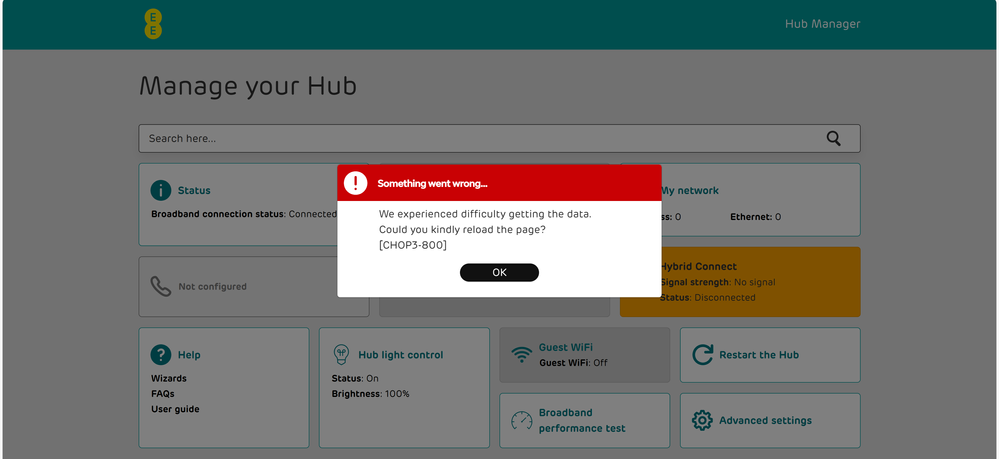
Solved! See the answer below or view the solution in context.
32 REPLIES 32


Options
- Mark as unread
- Bookmark
- Subscribe
- Mute
- Subscribe (RSS)
- Permalink
- Print this post
- Report post
11-02-2026 12:37 PM
@dieselnutjob You can do if you want, just be sure that you know all the problems and issues in doing that with whatever version of EE Router you have!


Options
- Mark as unread
- Bookmark
- Subscribe
- Mute
- Subscribe (RSS)
- Permalink
- Print this post
- Report post
11-02-2026 01:00 PM
I have noticed that this CHOPS3-800 seems to occur when there are difficulties with the internet. The error message I capture in the browser console when this happens is:
Access to fetch at 'https://event.vision.bt.com/vosp_event_recording/web/record' from origin 'https://192.168.1.254' has been blocked by CORS policy: Response to preflight request doesn't pass access control check: No 'Access-Control-Allow-Origin' header is present on the requested resource.
The Google AI explanation given for this is:
Understanding the problem
This console message indicates a Cross-Origin Resource Sharing (CORS) error. Your web application, hosted at https://192.168.1.254, is attempting to make a request to a different origin, https://event.vision.bt.com. By default, browsers enforce a security policy called the "Same-Origin Policy," which prevents a web page from making requests to a different domain than the one that served the web page. CORS is a mechanism that allows servers to explicitly grant permission for cross-origin requests.
The specific error, "Response to preflight request doesn't pass access control check: No 'Access-Control-Allow-Origin' header is present on the requested resource," means that your browser first sent an OPTIONS request (a "preflight request") to the server at https://event.vision.bt.com/vosp_event_recording/web/record. This preflight request is sent automatically by the browser to check if the actual request is safe to send. The server's response to this preflight request did not include the Access-Control-Allow-Origin header, which is essential for the browser to determine if it's allowed to proceed with the actual cross-origin request from https://192.168.1.254. Since this header was missing or did not include https://192.168.1.254 as an allowed origin, the browser blocked the request for security reasons.
Suggested fix
The fix for this problem needs to be implemented on the server-side (https://event.vision.bt.com), not on the client-side (https://192.168.1.254). The server needs to be configured to include the Access-Control-Allow-Origin header in its responses to allow requests from your origin.
Options
- Mark as unread
- Bookmark
- Subscribe
- Mute
- Subscribe (RSS)
- Permalink
- Print this post
- Report post
11-02-2026 01:57 PM
@tnj Is this now an outcome for the https than before when web manager was direct to the hub with http protocol in use?
The chop error did occur way back in time even with the hub was not connected on a vdsl or wan connection, oob but the subsequent FW update fixed that issue! No longer have an EE Router so unable to check that out!

- « Previous
- Next »
Related Content
