Turn on suggestions
Auto-suggest helps you quickly narrow down your search results by suggesting possible matches as you type.
- EE Community
- Home Services
- Broadband & Landline
- Router page - renaming connected devices - how?
Options
- Subscribe (RSS)
- Mark as unread
- Mark as read
- Float to top
- Bookmark
- Subscribe (email)
- Mute
- Print this discussion
Router page - renaming connected devices - how?


Options
- Mark as unread
- Bookmark
- Subscribe
- Mute
- Subscribe (RSS)
- Permalink
- Print this post
- Report post
21-11-2023 08:32 PM - edited 21-11-2023 09:08 PM
Hi, having recently switched over from the BT Smart Hub router to the EE Smart Hub Plus, there seems to be no way of changing the devices names connected in the router page, such as connected Printers, Tablets, Phones, TVs etc,
For example a Laptop is displayed in the router page as "Dell Windows PC/Laptop", and it doesn't pick up the actual name ie "X Laptop" set on the actual Laptop itself like the BT Home Hub did (you could enter a name for the device on the router page if you wanted to override it), and there seems to be no way to rename this device on the router page?!
Is that the case? Am I stuck with these names instead of being able to set the names of the devices that show up as connected devices in the router page.
I have some NAS devices that just show the MAC address now which is really annoying - Is there any way to fix this??
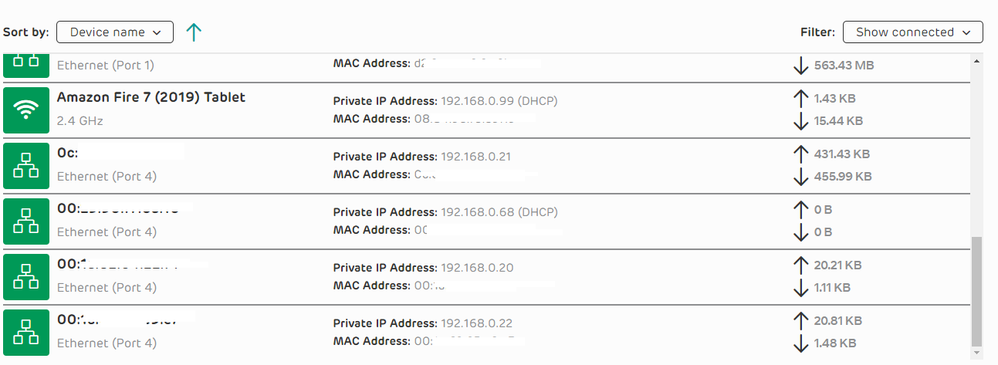
Devices that show up incorrectly:

38 REPLIES 38


Options
- Mark as unread
- Bookmark
- Subscribe
- Mute
- Subscribe (RSS)
- Permalink
- Print this post
- Report post
03-02-2026 01:35 PM
I'm having the same issue, I just upgraded from BT Fibre to EE Full Fibre and I can't change device names on the Pro router, this is a basic feature, and I'm shocked that I can't do it.


Options
- Mark as unread
- Bookmark
- Subscribe
- Mute
- Subscribe (RSS)
- Permalink
- Print this post
- Report post
04-02-2026 09:04 AM
@mrhuk You have to use the mobile EE App to change the names for the EE Router, when done then you can see if it has been effective and transferred the name over, The EE App will stick pretty good with the new name, sometimes the Router not so!

Options
- Mark as unread
- Bookmark
- Subscribe
- Mute
- Subscribe (RSS)
- Permalink
- Print this post
- Report post
06-02-2026 11:22 AM - edited 06-02-2026 11:26 AM
...and how is using the App a solution, where there is no access to a mobile phone, or tge Network is not accessible via the internet?
Most Network Admin's, access the Router via 192.168.1.254 or similar.
Options
- Mark as unread
- Bookmark
- Subscribe
- Mute
- Subscribe (RSS)
- Permalink
- Print this post
- Report post
06-02-2026 01:21 PM
@Network-Admin Then again most net admins would not be using an EE Supplied router, EE decided how it all works no one else! They just think everyone on the planet earth has a smart mobile phone, you want to use an EE Router then you are going to need a mobile, or run the EE app through an android portal software on your desired device, PC yes mac doubt that but you can try an ios version for the EE app!

Options
- Mark as unread
- Bookmark
- Subscribe
- Mute
- Subscribe (RSS)
- Permalink
- Print this post
- Report post
06-02-2026 01:27 PM
Good Idea about trying a Mac browser, Ios or MacOS, I shall report back
Another thing I don't like about the EE router, it doesn't allow you to
turn off the wifi password. I live half a mile from my nearest neighbor,
and do not need to be locked up in my own house against my will.
Norman
Another thing I don't like about the EE router, it doesn't allow you to
turn off the wifi password. I live half a mile from my nearest neighbor,
and do not need to be locked up in my own house against my will.
Norman
Options
- Mark as unread
- Bookmark
- Subscribe
- Mute
- Subscribe (RSS)
- Permalink
- Print this post
- Report post
06-02-2026 01:51 PM - last edited on 06-02-2026 02:07 PM by Peter_W
...you are correct, but there are some SMEs, that are using such devices at
startup, in their Labs.
I worked in a Lab, where we only had the original BT Router which had this
basic functionality, accessible via the Webpage, we didn't need a Phone App.
[Mod edit - removed personal details, please don't share these in public]
Options
- Mark as unread
- Bookmark
- Subscribe
- Mute
- Subscribe (RSS)
- Permalink
- Print this post
- Report post
06-02-2026 01:57 PM - edited 06-02-2026 02:17 PM
@Network-Admin If you have edit ability please go remove all your personal details, this is a PUBLIC Forum for all the world to see!
Thanks @Peter_W taking care, was allowing poster to do but at least you got it before i reported!

Options
- Mark as unread
- Bookmark
- Subscribe
- Mute
- Subscribe (RSS)
- Permalink
- Print this post
- Report post
06-02-2026 02:41 PM - edited 06-02-2026 02:42 PM
...made the changes in the App. The changes not reflected on the Webpage, where for some of the assets all I see are MAC Addresses instead of the required Asset Names..
Options
- Mark as unread
- Bookmark
- Subscribe
- Mute
- Subscribe (RSS)
- Permalink
- Print this post
- Report post
06-02-2026 03:21 PM - edited 06-02-2026 03:22 PM
I've always use the Router Page, via the IP Address, never needed to use an external App', from an administrative perspective, that is a retrograde step. Previous BT Routers had this basic functionality.
Having to ask EE Support to do something as basic as this, is just plain bonkers.
Options
- Mark as unread
- Bookmark
- Subscribe
- Mute
- Subscribe (RSS)
- Permalink
- Print this post
- Report post
06-02-2026 03:32 PM
@acdadona From above in the posting ""The EE App will stick pretty good with the new name, sometimes the Router not so!""
What applies to your situation, had both mac changed to the name, and mac just plain outright refused to change! The EE app always worked, so was either jump back look at the app, or write down the mac - name and refer to that when looking at the web manager!
Been like this for years now so would not expect a change to be applied or take affect but you just never know!

Related Content
- Wifi Multi-Device Dongle not picking up wifi printer. in Mobile Broadband
- Wifi extender won't attach to broadband despite power light being Aua Blue in Broadband & Landline
- I am writing to formally register a complaint regarding the service provided und in Broadband & Landline
- EE WiFi 7 Router & Amplifi HD mesh in Broadband & Landline
- New router WiFi dropout in Broadband & Landline
